
Unified inbox for beauty salons
Different messaging apps.
One place for your team.
Client conversations, automated messages, conversation owners and Altegio visit details — together in your salon’s workspace.
See the inbox in action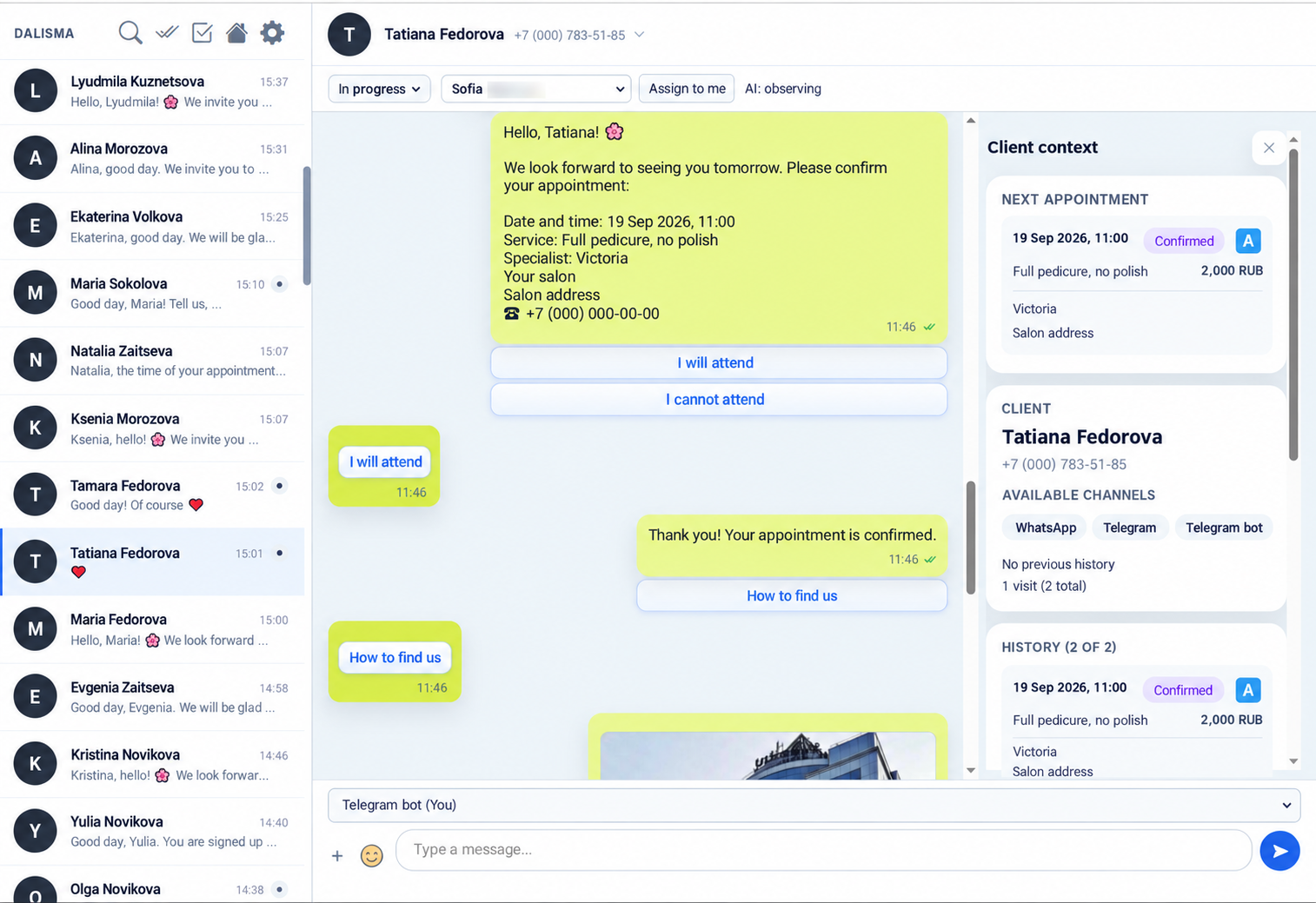
The conversation stays together.
So does the context.
A client replies to an automated reminder, asks to move an appointment or picks up a conversation with yesterday’s receptionist. Your team can read the conversation and the software’s messages in one history, with visit details alongside. They can see what has already been said and continue from there.
Automation meets conversation
Your software sends it.
Your team can see it.
Invitations, appointment details, reminders and feedback requests remain part of the conversation. When a client replies, the receptionist can read the earlier messages and step in without asking the client to forward the reminder.
Illustrative conversation.
The channels clients use.
A shared place to work.
Connect the channels you agree with us and work from Dalisma. Your team can use the web inbox without a VPN. Incoming messages, buttons and message statuses depend on the channel.
Messaging channels
Stay in touch
where your clients are.
Messaging apps, bots, SMS and email.
We connect and configure the channels your salon or group needs.
-
Telegram
Salon account
- Bot
Telegram bot
Salon bot
-
WhatsApp
Messaging app
-
SMS
Text messages
SMS messages are charged separately at your provider’s rates.
-
Email
Email messages

Conversations from connected messaging apps sit alongside client history in Dalisma.
aggregator to buy
We agree connections and message volumes before launch. Conversation features vary by channel.
A clear next step
See which conversations
need your attention.
Use “Needs a reply” to focus on conversations waiting for your team. “Mine” brings together your assigned conversations; “Unassigned” helps you find those without an owner. “In progress” and “Waiting for client” distinguish who needs to act next. When the question is resolved, complete the conversation.
A new shift.
The same conversation.
Several team members can use the inbox in parallel. Take a conversation, assign an owner or hand it over to a colleague. The next receptionist can read the available history, including the client’s question and the arrangements already discussed.
Illustrative handover
A named owner makes responsibility for the next reply clear.
The appointment is
right beside the conversation.
The client panel brings together visit details: services, team members, dates, prices, statuses and comments. To check or change a booking, open the relevant appointment in Altegio directly from the conversation. Your schedule and bookings stay in the system your team already uses.
Example workflow: a client replies to a reminder and asks to reschedule.
Prefer WhatsApp?
Keep that preference.
Set or change a client’s preferred messaging channel. You can also share a communication preferences page so the client can choose their main channel and connect other available options. Sending rules take both preference and channel availability into account.
Illustrative preference

A preference guides communication alongside the connection and sending rules.
One salon or several.
Find the conversations you need.
Filter by organisation, location or messaging channel. Receptionists can focus on their location while managers review the conversations available to them across the relevant salons. Search helps the team find a client quickly.
Included in Dalisma
We set it up.
And help keep the work moving.
The inbox is part of the Dalisma service. Together, we choose the channels, agree how conversations should be handled and configure the workflows. After launch, we check how the work continues and make agreed improvements. Your salon team handles conversations that need a person; the software carries out the configured steps.
See the inbox in actionA few practical questions.
Do we need to move our bookings out of Altegio?
No. Altegio remains your booking system, schedule and main client database. Dalisma adds conversations and agreed workflows. You can open the relevant Altegio appointment from the conversation.
Can the team see automated messages?
Yes. Messages sent by the software and conversations received through connected channels appear in a shared history. We confirm the connections and available history during setup.
Can several receptionists use the inbox at once?
Yes. Team members can work in parallel, take ownership of conversations and hand them over to colleagues. Assignees, statuses and filters help organise the work.
Does the Dalisma inbox require a VPN?
Your team does not need a VPN to work in the Dalisma web inbox. This refers to the Dalisma interface, rather than access to every client messaging app.
Do all channels support the same features?
No. Incoming messages, conversation features, buttons and delivery or read statuses depend on the channel and connection. We agree the channels and scenarios before launch.
What is included, and what costs extra?
Dalisma software, the unified inbox, setup and ongoing management are included within the agreed service. Your Altegio subscription and SMS messages at provider rates are paid for separately. We agree connections, message volumes and the scope of work before starting.
See how it fits your salon
Your clients.
Your team.
One inbox.
We’ll walk through a receptionist’s workflow, from a client message to an appointment and a handover. Then we’ll discuss your channels, locations and team routines.
See the inbox in action
Leave your contact details and we’ll arrange a demonstration.